

|
|
||
|
|
| Home | Basic search | Fulltext search | Search by ID | Statistics | Documents | Help |
Editorial Board Main PageEditorial Board Main Page cotains the list of all requests that are currently awaiting the QA/QC procedures in the editorial board. Each row of the list represents one particular request and contains information such as:
Editorial Board - Emission Factor QA/QC StatusAccording to current user privileges, this page is used to view all comments made by editorial team members, add comments and COMMIT/DISCARD one particular request. Every single comment regarding one particular request is displayed here. Records are ordered by datetime of submission in descending order.Users with Commenting EF input/revision/removal requests privilege will see Add comment button at the bottom of the page. This button is used to add new comment to the list of existing comments. Clicking this button will display ACCEPT and REFUSE option buttons and a textbox where user can type in the reason of his decision. Users with COMMIT/DISCARD EF input/revision/removal requests privilege will see COMMIT and DISCARD buttons at the bottom of the page. COMMIT button is used to commit request made by data provider thus making the request "visible" in the live EFDB database. DISCARD button will reject the request made by data provider. In both cases an E-MAIL message is sent to the data provider to notify him of the action made by publisher. How it worksThe Emission factor input/revision/removal request processing is described in the picture below.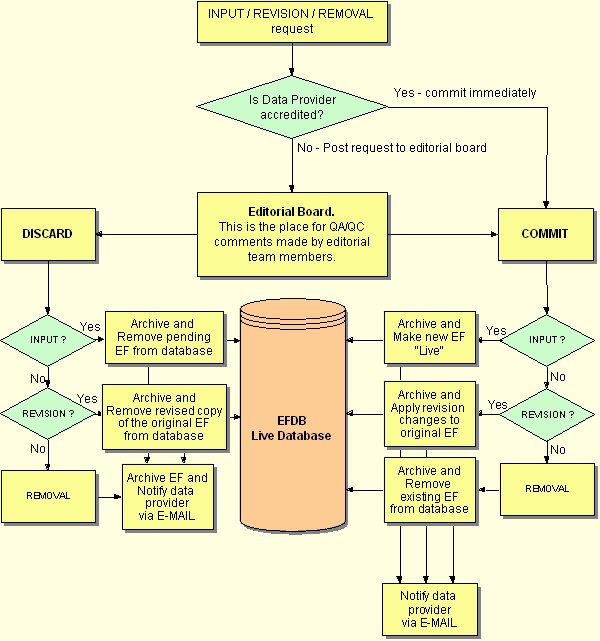
If data provider is accredited all input/revision/removal requests made by this kind of data provider are immediately commited into the live database. If data provider is not accredited all requests are posted to the editorial board. There are three different approaches of processing the requests depending on their type (INPUT, REVISION, REMOVAL). INPUT Request When new Emission Factor is submitted by data provider it will be stored in the database and marked as "pending" (not available to public). Input request is automatically posted to the editorial board. This new request will appear on the Editorial Board Main Page. If editorial team decides to COMMIT this new EF, this EF will be marked as "live" (available to public). If editorial team decides to DISCARD this new EF, it will be deleted from the database. In both cases E-MAIL message will be sent to the data provider to notify him about editorial team decision. REVISION Request After data provider saves the revision of existing emission factor, a copy of the original EF is created applying revision changes to that copy in the database. Original EF will remain untouched and still available to public. If someone else tries to revise this EF, he will be informed that it is not possible to revise this EF, because its last revision is still being a subject of QA/QC procedures. Revised copy of the EF is submitted to the editorial board. If editorial team decides to COMMIT this revised EF, original EF will be replaced with its revised copy. If editorial team decides to DISCARD the revision, revised copy of the existing EF will be removed from the database. In both cases E-MAIL message will be sent to the data provider to notify him about editorial team decision. REMOVAL Request When data provider requests to remove existing EF from the database, request will be automatically posted to the editorial board leaving the existing EF untouched and available to public. If editorial team decides to COMMIT (remove in this case), this EF will be removed from the database. If editorial team decides to DISCARD the removal request, EF will not be deleted from the database. In both cases E-MAIL message will be sent to the data provider to notify him about editorial team decision. IMPORTANT: Removal request of the emission factor is always posted to the Editorial Board even if the user has privileges to Bypass Editorial Team! |